


AI Agents in WordPress: How to Automate Content Creation Without Losing Quality
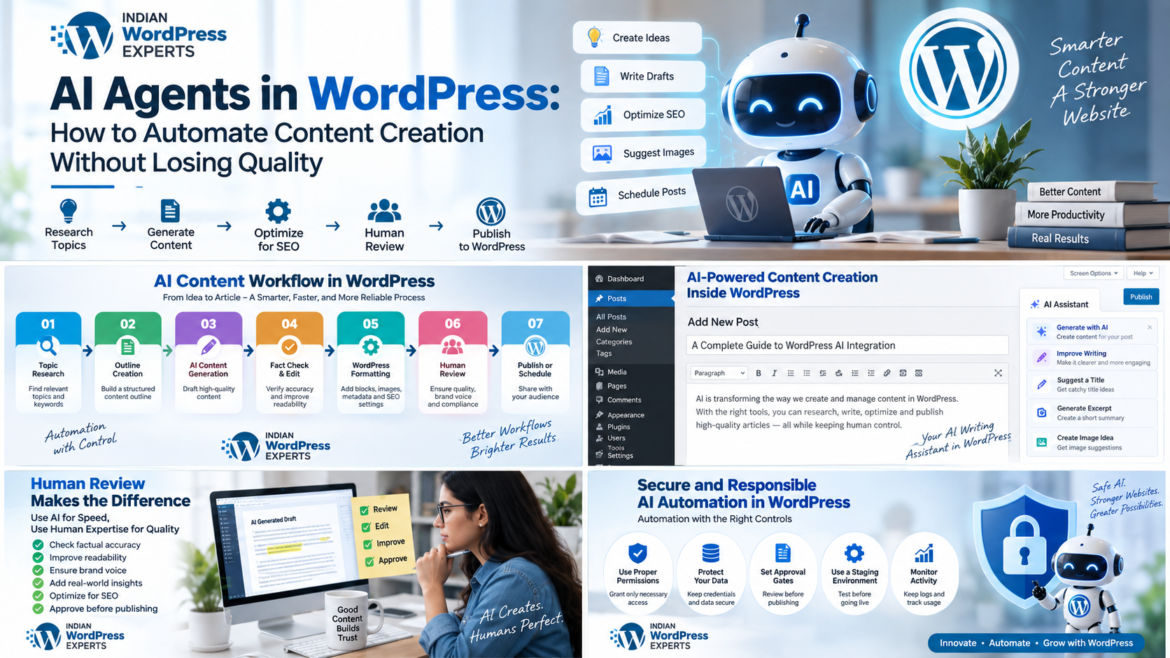
https://www.indianwordpressexperts.com/wp-content/uploads/2026/09/ChatGPT-Image-Sep-11-2026-09_29_19-PM-1024x576.png 1024 576 admin admin https://secure.gravatar.com/avatar/ceb7f684f6c20730fc00f6a6d55ffd88?s=96&d=mm&r=gAI agents in WordPress are changing how publishers approach research, drafting, optimization, and publishing. Instead of treating artificial intelligence as a simple text generator, businesses can use agent-based workflows to complete connected tasks while keeping human editors responsible for accuracy, originality, brand voice, and final approval. WordPress is also building a stronger foundation for AI through its Abilities API and MCP Adapter.
What Are AI Agents?
An AI agent is a software system that can interpret a goal, use available tools, perform multiple steps, and adjust its actions based on results. A conventional chatbot might generate a paragraph after receiving a prompt. An agentic workflow can receive a broader instruction such as “prepare next week’s WordPress article,” research approved sources, create an outline, draft sections, suggest metadata, prepare an image brief, and place the result into WordPress as a draft.
This distinction matters because automation becomes useful when it coordinates a process rather than simply producing words.
How AI Agents in WordPress Work
AI agents in WordPress can connect several parts of the publishing workflow. Depending on the tools and permissions configured, an agent may:
- Analyze existing posts to identify topics and content gaps.
- Build topic clusters from a keyword strategy.
- Create outlines based on search intent.
- Draft or rewrite sections.
- Suggest titles, excerpts, categories, and tags.
- Generate image concepts and alt text.
- Check internal linking opportunities.
- Prepare SEO metadata.
- Save content as a draft for editorial review.
- Schedule approved content.
WordPress’s current AI ecosystem is moving toward standardized capabilities. The official AI plugin supports features such as AI-assisted summaries and content access, while the AI Client is intended to provide a provider-agnostic way for WordPress functionality to interact with AI models.
The goal should not be “publish as much as possible.” It should be “remove repetitive production work while increasing editorial control.”
A Practical AI Content Workflow
A well-designed AI agents in WordPress workflow should separate research, generation, review, and publishing instead of treating them as one automated action.
1. Topic and Search-Intent Research
Start with a human-approved content strategy. Give the agent a defined audience, subject area, search intent, market, and business objective. Ask it to group keywords by informational, commercial, navigational, and transactional intent.
Do not let the agent decide the entire editorial calendar without supervision. Search volume alone does not establish whether a topic deserves publication; relevance, expertise, competition, business value, and existing site coverage also matter.
2. Source Collection and Fact Checking
AI content generation becomes much safer when the workflow requires evidence. The agent should distinguish between facts supplied by the business, information from trusted sources, and claims that still need verification.
For regulations, prices, product specifications, finance, or rapidly changing technology, require source checking before publication.
3. Outline Creation
AI agents in WordPress can transform an approved topic into a structured outline containing an introduction, logical H2 and H3 sections, examples, FAQs, and a conclusion. This is also a good place to enforce editorial rules such as minimum depth, audience reading level, prohibited claims, and brand terminology.
4. Drafting
Use a detailed content brief rather than a vague instruction such as “write an SEO article.” Specify the primary keyword, secondary terms, search intent, audience, word range, internal links, sources, tone, examples, and conversion goal.
5. Editorial Review
Human review should check factual accuracy, originality, usefulness, readability, citations, keyword placement, brand voice, and whether the article actually answers the reader’s question.
6. WordPress Formatting
AI WordPress plugins or custom integrations can assist with formatting blocks, headings, links, excerpts, image metadata, and SEO fields. WordPress’s official AI tooling can support tasks such as generating featured images, excerpts, titles, and alt text when configured with an appropriate connector.
7. Draft, Review, Then Publish
The safest default is to let automation create a draft rather than immediately publishing it. Automatic publication should be considered only for low-risk, tightly controlled content after the workflow has demonstrated consistent accuracy.
Choosing AI WordPress Plugins
Before deploying AI agents in WordPress, test the workflow on a staging site and measure editing effort, accuracy, and publishing reliability.
There is no single plugin ideal for every website. WordPress.org lists AI and content-generation plugins for writing, SEO, chat, image generation, and automation, with different editor and external-service support.
When evaluating AI WordPress plugins, examine model and provider support, credential security, WordPress compatibility, editor support, draft/publishing controls, SEO integration, image capabilities, bulk limits, logging, privacy, and update frequency.
Avoid choosing a plugin simply because it promises “one-click automated blogging.” The important question is whether it gives you enough control over the workflow.
How to Preserve Content Quality
The biggest weakness of uncontrolled automation is generic, repetitive, or inaccurate information at scale.
AI agents in WordPress should therefore operate under explicit quality rules.
Create a Brand Voice Guide
Document preferred terminology, sentence style, audience, formatting conventions, claims that require evidence, and phrases the brand avoids. A specific guide helps produce consistent drafts.
Use a Content Brief
Every article should have a defined purpose. Include the reader’s problem, search intent, primary keyword, secondary topics, unique angle, supporting evidence, internal links, CTA, and editorial requirements.
Add Human Approval Gates
Use approval gates before publication:
Research → outline approval → draft → fact check → SEO review → editorial approval → WordPress draft → final publication
This prevents a single incorrect AI decision from becoming a published mistake.
Require Evidence for Factual Claims
Agents should flag unsupported statistics, dates, quotes, product claims, and technical statements. Fact checking is especially important for competitive search topics.
Avoid Keyword Stuffing
Search optimization should support readers rather than turn an article into a list of repeated phrases. Use related concepts naturally and focus on topical completeness, clarity, and usefulness.
Review AI-Generated Images
If AI is used for images, check that the visual accurately represents the topic and has no misleading text or distorted logos. Add descriptive alt text based on the actual image.
Examples of Useful Automation
A small business blog could automate approved-topic research, outlines, drafts, internal-link suggestions, image briefs, and draft saving. An ecommerce site could automate product-description drafts, category updates, FAQs, and image alt text while staff verify specifications. A publishing team could review older articles, propose revisions, and send them to an editor.
The WordPress ecosystem is increasingly suited to this workflow. The Abilities API provides a standardized way to register discoverable and executable functionality, while the MCP Adapter can make selected abilities available to compatible external AI clients.
Security and Governance
Security is especially important when AI agents in WordPress can call publishing functions or access site data.
Automation should follow the principle of least privilege. An AI agent that can edit posts does not necessarily need permission to manage users, change plugins, modify site settings, or access sensitive customer information.
Use separate roles, API credentials, and staging environments where appropriate. Keep backups and logs, and limit which WordPress capabilities an agent can call. Current WordPress connector tooling supports providers such as OpenAI, Anthropic, and Google, with administrators able to enable specific AI options rather than every capability by default.
AI Automation WordPress: A Better Operating Model
The strongest model is not “AI replaces the content team.” It is “AI handles repetitive execution while people own strategy and accountability.”
For example, an editorial manager can decide what the company should publish. An agent can gather approved information and create the first draft. An editor can verify the claims and improve the argument. WordPress automation can then handle repetitive formatting and publishing preparation.
This division of responsibilities improves efficiency without turning the website into an uncontrolled content factory.
Common Mistakes to Avoid
Avoid publishing unreviewed drafts, using one prompt for every topic, treating AI output as automatically factual, ignoring search intent, stuffing keywords, creating repetitive articles, granting excessive permissions, installing overlapping plugins without testing, and measuring success by article volume instead of qualified traffic, engagement, leads, and conversions.
A Quality-First Implementation Plan
The practical advantage of AI agents in WordPress is not maximum automation; it is controlled automation that consistently produces review-ready work.
If you are starting from scratch, begin with one narrow workflow, such as research-to-draft for a single blog category. Measure accuracy, editing time, publication time, organic performance, and engagement. Once reliable, add internal-link suggestions, metadata, image briefs, or content refreshes.
Organizations needing custom WordPress development can build workflows around APIs and WordPress-native capabilities when they have specialized editorial rules, proprietary data, complex approval stages, or multiple content types.
For businesses planning a tailored WordPress AI workflow, Indian WordPress Experts can assess the existing website, content architecture, integrations, performance requirements, and automation opportunities before development begins.
The Future of AI-Powered WordPress Publishing
WordPress development suggests that AI will increasingly become an operational layer rather than a standalone writing button. Standardized abilities, AI model connectivity, and MCP-based tool access can let AI systems interact with selected site functions under controlled permissions.
Human expertise remains essential. Competitive advantage comes from original insights, trustworthy information, strong editorial standards, first-hand experience, and audience understanding.
Conclusion
AI agents in WordPress can make content operations faster, but automation alone does not guarantee quality. The best results come from combining structured workflows, trusted sources, detailed briefs, human review, security controls, and measurable publishing goals.
Start small, automate repetitive tasks, keep publication approval in human hands, and expand only after the workflow proves reliable. Used this way, AI can become a practical production assistant rather than a replacement for editorial expertise.
For companies planning WordPress AI integration, the implementation should fit the website’s goals, content model, technical stack, and governance requirements. A carefully designed system can reduce repetitive work while preserving accuracy, originality, and quality.